


 Barco
BarcoMeeting Room SolutionsSKU ClickShare USB-C Extension over CAT kit
Barco ClickShare USB-C Extension over CAT Kit
The Barco ClickShare USB-C Extension over CAT kit extends USB 2.0 and DisplayPort connectivity up to 40 m over CAT cabling for meeting-room installations. It supports 4K at 30 Hz for wired content sharing and is powered by the ClickShare Hub. Procure.ae supplies the kit across the UAE.
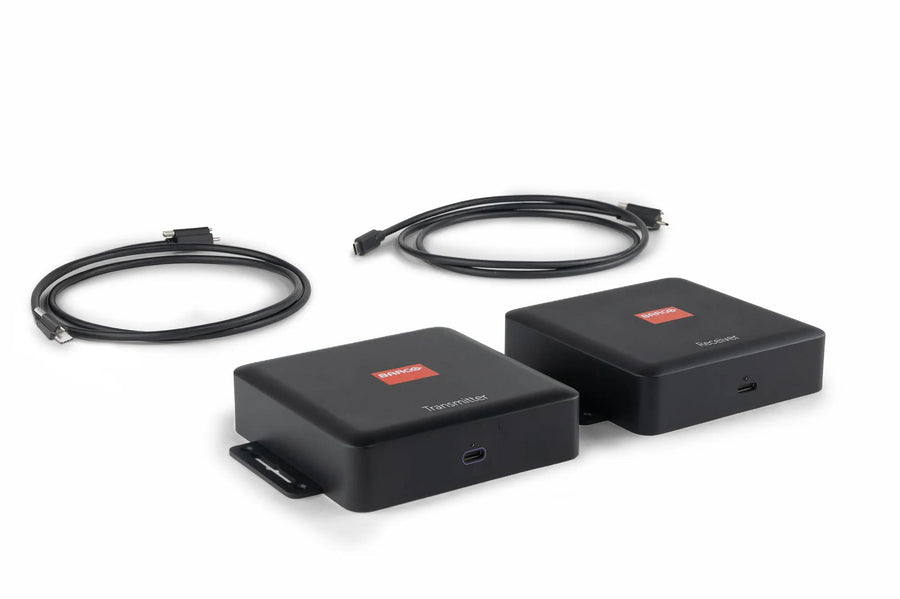
The kit has a TX box and an RX box. The manufacturer's specifications list 4K at 30 Hz for wired laptop content sharing and up to 1080p at 60 Hz between the ClickShare Hub and the Control Panel. Cable runs of up to 60 m over Cat 5e/Cat 6 (70 m over Cat 6a/Cat 7) are listed for Control Panel links, and up to 35 m (40 m for Cat 6a/Cat 7) for wired laptop sharing. Each box measures 152 mm wide, 122 mm high and 34 mm deep.
The kit is designed for complex meeting-room cable routing, so the Control Panel or a participant's device can sit far from the ClickShare Hub. The manufacturer lists compatibility with ClickShare Hub Core and Pro, and wired content sharing with the ClickShare CX-50 Gen2. Built-in mounting holes allow desk, ceiling or wall fixing.
Resolution
3840 x 2160 (4K UHD) at 30 Hz
Type
USB-C Extension Kit
Weight
TX box 333 g, RX box 315 g
- Extends USB 2.0 and DisplayPort
- 4K wired sharing
- Hub-powered Control Panel links
Delivery across UAE & GCCDubai, Abu Dhabi, Sharjah & beyond
Manufacturer warrantyBacked by the brand
InstallationArranged on request
Key features
01
Extends USB 2.0 and DisplayPort
Carries signals up to 40 m from the Control Panel or participant device.
02
4K wired sharing
Supports 4K at 30 Hz for wired laptop content sharing.
03
Hub-powered Control Panel links
The ClickShare Hub powers the TX and RX boxes, so no extra power supply is needed for these links.
04
Laptop charging
A connected laptop can charge when an external power supply is connected.
05
Flexible mounting
Built-in holes for desk, ceiling or wall mounting.
Specifications
15 specificationsGeneral
CompatibilityClickShare Hub Core/Pro, ClickShare CX-50 Gen2
Key FeaturesExtends USB 2.0 and DisplayPort up to 40 m, Hub-powered, 4K wired laptop sharing, Laptop charging with external power
ModelClickShare USB-C Extension over CAT kit
TypeUSB-C Extension Kit
What's in the BoxTX box, RX box, 1.2 m USB-C to USB-C cable (2), screws
Display
Resolution3840 x 2160 (4K UHD) at 30 Hz
Performance
Storage Conditions-40 to 85 °C
Connectivity
PortsUSB-C × 2 (TX box), USB-C × 1 (RX box)
Power
Power ConsumptionTX box 19.894 W, RX box 4.623 W (control panel link)
Physical
Dimensions152 x 122 x 34 mm (W x H x D)
LengthUp to 60 m (Cat 5e/6), 70 m (Cat 6a/7) to control panel
MountingDesk, ceiling or wall (built-in mounting holes)
Operating Temperature0 to 40 °C
WeightTX box 333 g, RX box 315 g
Compliance
Warranty1 year
Downloads
Manufacturer documents for the Barco ClickShare USB-C Extension over CAT Kit — datasheets, manuals, drawings and certificates.
Questions
Can’t find your answer? Ask on WhatsApp
What does the ClickShare USB-C Extension over CAT kit extend?
It extends USB 2.0 and DisplayPort connectivity up to 40 m from the ClickShare Control Panel or a meeting participant device, over CAT cabling. Cable runs of up to 60 m over Cat 5e/Cat 6 are listed for Control Panel links, and up to 35 m for wired laptop sharing.
Is the kit compatible with ClickShare Hub Core and Pro?
Yes. The manufacturer lists ClickShare Hub Core and Pro for the connection between the base unit and the Control Panel, and for wired content sharing. The ClickShare CX-50 Gen2 is also listed for wired content sharing.
Does the kit need its own power supply?
No, for Control Panel links the TX and RX boxes are powered by the ClickShare Hub. For laptop sharing, the TX box is powered from the laptop or from an external USB-C power adapter rated above 100 W.
Can I buy the ClickShare USB-C Extension over CAT kit in the UAE?
Request a quote via WhatsApp +971 4 546 5041 or email info@procure.ae.




